Why we built a free indoor-cycling app
You bought a smart trainer. It can hold a power target, simulate a climb and talk to your phone over Bluetooth. Then you discover that using it comfortably means another monthly payment, and often an account, for software that mostly does one thing: tell the trainer what resistance to apply.
That is the whole origin of Spindro. We wanted to ride our own trainer, with our own legs, without a subscription. So we wrote the app we wanted, and we are publishing it for free.
What Spindro does
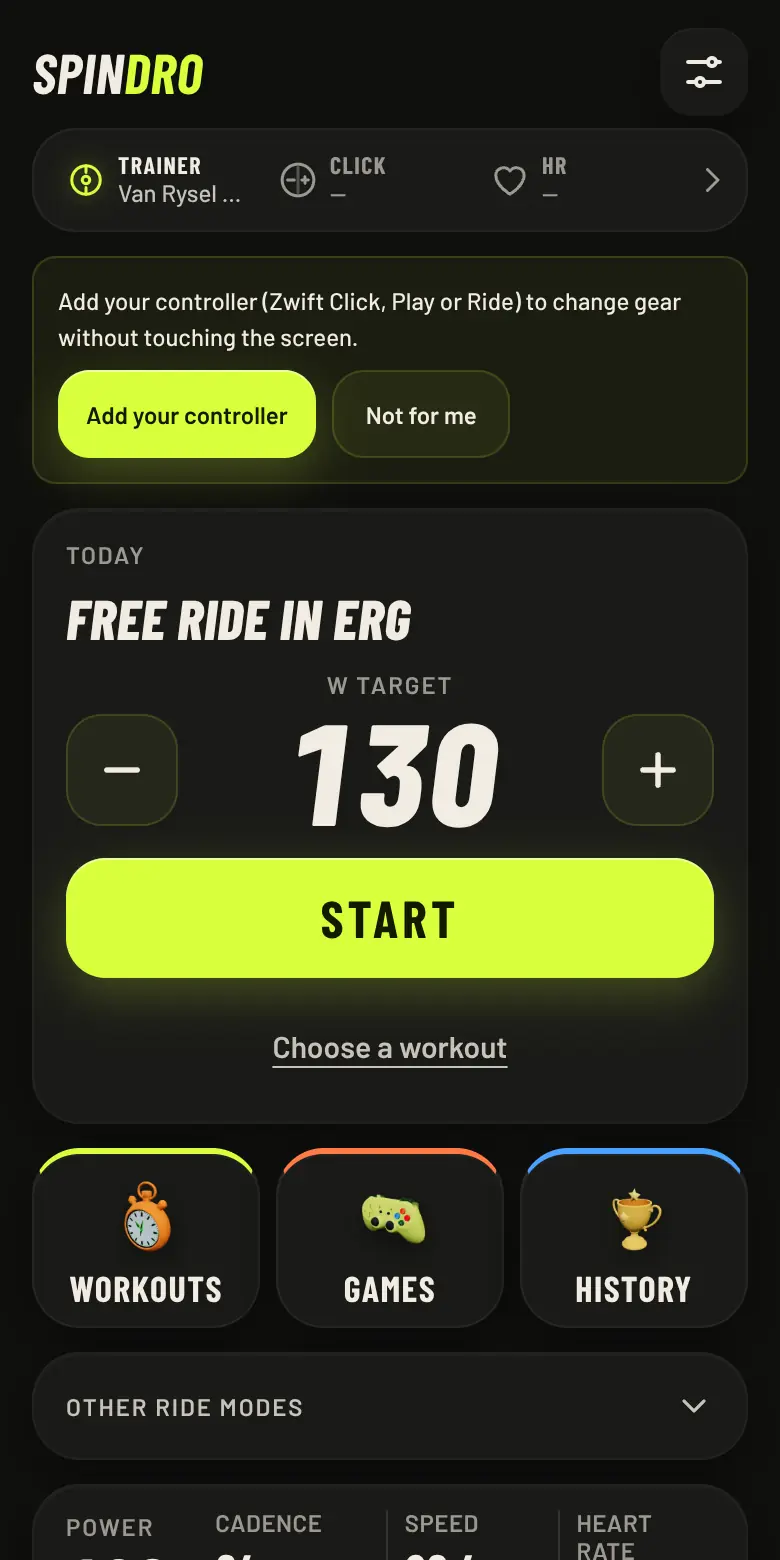
It connects to your trainer over Bluetooth and controls it. The home screen is built around ERG, the mode where the trainer holds the power you ask for: a target in watts, a minus and a plus, and a Start button. If you prefer to ride like on the road, virtual gears give you 24 ratios and you shift them yourself.
On top of that sit the things a training app needs:
- Structured workouts and plans. 34 workouts from 24 to 90 minutes and four multi-week plans, all in percent of your FTP, so they scale to you. You can build your own, import
.zwofiles and export.zwoor a Garmin workout file. - Games that are workouts. Six 3D games, each one a 5, 10 or 20 minute session with efforts and recoveries. There is a whole article about how they are designed.
- Your devices in one place. A single "Add device" button pairs a trainer, a Zwift controller, a heart rate strap, a power meter or a cadence sensor, and the app works out which is which.
- A record of what you did. History, power records, an FTP estimate, and optional upload to Strava. On the Android app the phone can also broadcast power, cadence and speed so a watch records the ride.
What it does not do
We would rather say this plainly than have you find out on a cold Tuesday evening.
- There is no online world. No multiplayer, no other riders, no virtual roads with real people on them. The games are solo, and a YouTube ride video plays at your speed but is not a course.
- It has been ridden on one trainer. We have tested one trainer for real, a Van Rysel D100, and the + and − keys of one Zwift Click. Everything else is built from public specifications and tested against simulated devices. Most smart trainers of recent years speak the standard Bluetooth protocol for fitness machines (FTMS), so we expect many to work, but expecting is not knowing. The compatibility page says exactly what we know.
- Some things are experimental. Support for older Tacx and Wahoo protocols and for the Zwift Play and Ride controllers has only been checked against simulators.
- iPhone and iPad need another browser. Safari does not allow Web Bluetooth. A browser that adds it, such as Bluefy, should work, but we have not tried it.
How it is built
Spindro is a static web app: plain JavaScript files, no bundler, no server of our own that your rides pass through. The Android app is the same code in a Capacitor shell. Your rides, records and settings stay on your device; there is no account to create. Data leaves the device only if you choose to use Strava, play a YouTube video or export a file. This website counts visits anonymously, without cookies, and the app asks before it counts anything.
The code is public under the GPL-3.0 licence, which means it stays public, including in anyone's modified version.
About subscriptions
The best-known indoor-cycling platforms are paid subscriptions. That is a legitimate way to fund a large service with live worlds and servers. It is also not what everyone wants to pay for when they own the trainer and want to follow a workout. Spindro is a different trade: less spectacle, no recurring bill. Zwift, Garmin, Strava, Tacx, Wahoo, Van Rysel and the other names we mention are trademarks of their owners, and we are not affiliated with them.
Help us make the table honest
The most useful thing you can do is ride it and tell us. If you try your trainer, open the app's "Report your trainer" option or an issue on GitHub with the model, what worked and what did not. Every report turns a "should work" in our table into something real. If you can write code, there is a page about building a game too.
Open the web app, connect the trainer, ride. It takes about a minute.
Keep reading
How virtual gears and ERG mode work on a budget trainer
What FTMS is in plain words, what ERG does, why the app re-sends the power target every two seconds on some trainers, how cadence is estimated from the flywheel, and what a controller adds.
Read · 5 min readGames that are workouts
Spindro's six games follow a few design rules so that playing is training: sessions in percent of FTP, three levels, something to do every few seconds. And an invitation to build one.
Read · 5 min read